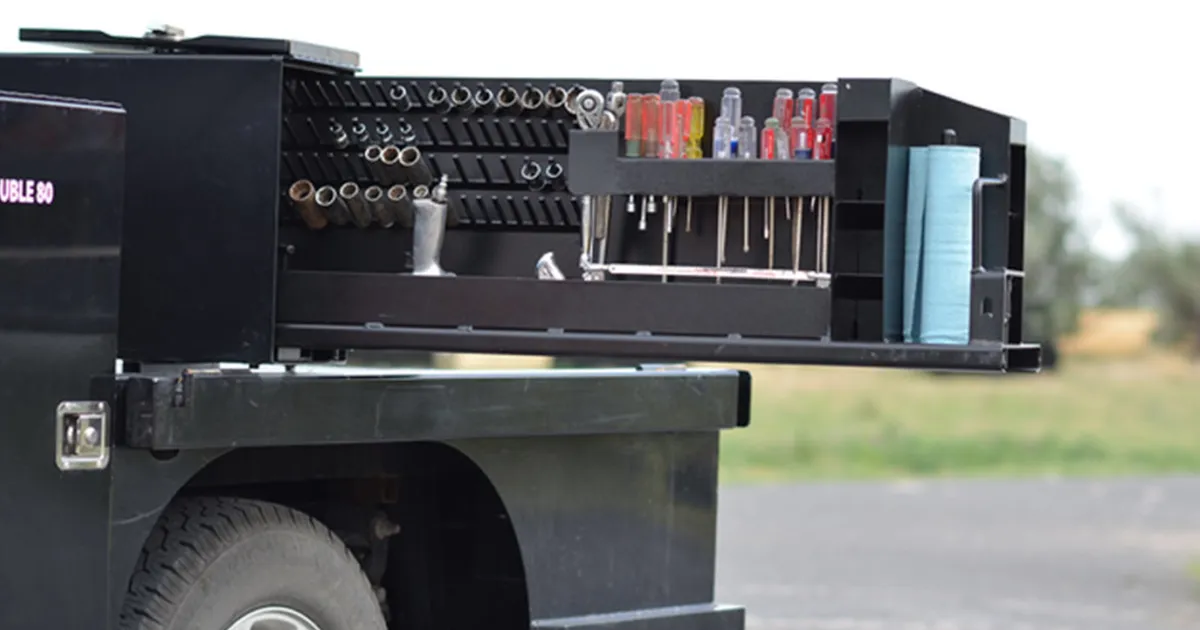
A toolbox should function like a system, not a storage bin. When your tools have a home and your layout stays consistent, you work faster and waste less time searching, re-staging, and replacing lost tools. This guide explains how to make a Shop-N-Box toolbox work for you by choosing the right model, setting up modular inserts, and building a repeatable layout that matches how you actually work.
- Who this helps: trades, service trucks, fleet managers, oilfield crews, farmers and ranchers
- What you will know: how to pick a model and build a layout that saves time daily
- What to do next: request a quote with your truck details and tool priorities
How do you choose the right Shop-N-Box toolbox for your needs?
Choose the model that fits your mounting space and workflow, then build the insert layout around your daily tools.
The first step is matching the toolbox to the way you work. If the box does not fit the truck and the workflow, the layout will never stay clean. Shop-N-Box offers multiple models for different mounting locations and use cases, and quotes are built around your configuration.
Good starting points:
- 2-80 toolbox for an 80-inch class toolbox with two roll-out compartments
- 1-80 series toolbox for an 80-inch class toolbox with one roll-out compartment
- 65 A/B toolboxes for compact configurations
- 2-65 A/B toolbox configuration for a mid-size dual toolbox setup
- Fleetside Box for standard pickup bed systems with organized access
Important note: JP Elite 40 and JP Elite Super 40 are not roll-out systems - they open and unfold to reveal tools. If you are considering those, start here:
If you want the core concept behind Shop-N-Box access, read how the patented roller system works.
What is the fastest way to build a toolbox layout that saves time?
Start with your daily tool list and give every core tool a dedicated home using inserts and vertical organization.
Most wasted time comes from one thing - hunting for tools that should be easy to grab. The fix is building the layout around what you touch constantly, not what you use once a month.
A simple method that works across industries:
- List your daily tools (the tools you grab constantly)
- List your weekly tools (the tools you need for specific jobs)
- List your specialty tools (the tools you use less often but must keep ready)
- Assign a home for each category using tool organizer inserts and storage inserts
The goal is a repeatable layout where the right tool is always in the same place.
How do modular inserts make a toolbox more flexible?
Modular inserts let you swap organization styles without rebuilding the whole toolbox, so the setup stays useful as your work changes.
Your tool loadout is not static. Jobs change, seasons change, and crews change. A modular system allows you to adjust without turning the truck into a temporary pile.
Benefits of modular inserts:
- Swap between tool organizer inserts, storage inserts, and blank inserts
- Reconfigure sections for parts, fittings, or specialty tools
- Keep the layout predictable even when the work shifts
Capacity varies by model and insert configuration, but the outcome is the same - a toolbox that stays organized and fast to use.
Why does a repeatable layout matter for fleets and shared trucks?
Repeatable layout reduces training time, improves accountability, and keeps every truck consistent across crews.
If multiple people touch the same truck, the layout needs to be predictable. If multiple trucks serve the same operation, standardization becomes a competitive advantage. A repeatable setup makes it obvious when a tool is missing and makes it easier for new hires to be effective faster.
If you are outfitting multiple units, start with the fleet page and build a standard layout first, then replicate it.
What common mistakes keep a toolbox from staying organized?
The biggest mistakes are overloading the daily zone, mixing categories, and not designing the layout around how you actually work.
Most messy trucks fail for predictable reasons:
- No dedicated home for core tools
- Too many "misc" bins that become junk drawers
- Daily tools buried behind occasional tools
- The layout changes every time the truck is used
A good system prevents that by separating categories, keeping daily tools easiest to reach, and building the layout around repeated daily cycles.
How do you get a Shop-N-Box toolbox configured correctly the first time?
Request a quote with your truck details and tool priorities so the layout is built around your workflow, not guesses.
If you want the right setup without trial and error, submit a quote request with:
- Truck year/make/model and mounting location
- Your industry and daily use (rough roads, jobsite access needs, etc.)
- The tools you grab daily and weekly
- Any visibility or space constraints
Start here: request a quote. If you want to compare the roll-out concept, review how it works before you submit.
For general safe handling and storage practices, OSHA resources on hand and power tools are a useful reference. (https://www.osha.gov/hand-and-power-tools)
Related resources
On Shop-N-Box
- Request a quote for a toolbox configuration
- How the patented roller system works
- Fleet tool storage systems and standardized layouts
- 2-80 toolbox
- 1-80 series toolbox
- Fleetside Box for pickup beds
External